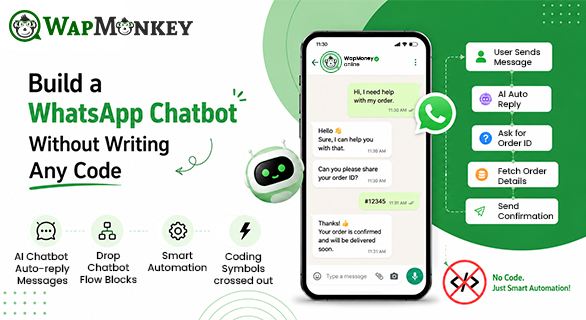
Build a WhatsApp Chatbot Without Writing Any Code
Many businesses struggle to manage customer communication as their customer base grows. Delayed replies, missed opportunities, and inconsistent follow-ups can directly impact business growth. When a potential lead messages your business late at night, making them wait until the next morning can increase the chances of losing that customer.
This is where WapMonkey helps businesses streamline communication and improve customer engagement through WhatsApp automation. You do not need an expensive team of developers or complex technical knowledge to fix this problem. With modern technology, you can easily build a WhatsApp chatbot without writing any code, giving your business a 24/7 active assistant.
What Is a No-Code WhatsApp Chatbot?
A no-code chatbot is an automated messaging system that handles customer conversations without requiring any traditional programming or coding. Instead of writing lines of code, you use a visual, web-based interface to design how the conversation flows.
Does a chatbot really work without coding? Absolutely, yes! Advanced cloud platforms manage all the complex technology in the background. For the user, it is as simple as drawing a visual map. You can connect questions to specific answers, set up interactive elements, and launch a fully functional WhatsApp business chatbot entirely on your own terms.
Total Control: Set Up and Customize It Exactly Your Way
The biggest advantage of a modern no-code chatbot is complete creative freedom. You do not have to adapt your business to a rigid software; instead, the software adapts to you.
Using an intuitive drag-and-drop chatbot flow builder, you can design the customer journey exactly the way you want:
- Mimic Human Tone: You can set up the chatbot to match your brand's unique voice—whether it is professional, casual, or friendly.
- Instant Changes: If you introduce a new product or change your business timings, you can update the chatbot flow instantly. There is no need to wait for a developer to fix the code.
- Visual Mapping: You can visually see how a customer moves from a simple "Hello" to final lead qualification, making it incredibly easy to manage.
Massive Business Problems You Can Solve Using a Chatbot
Running a business without automation creates several operational bottlenecks. Introducing the chatbot follows predefined flows and helps deliver consistent information to customers.
mart chatbot helps you solve major daily problems instantly:
- The Problem of Instant Support: Human agents cannot be online 24/7. A chatbot solves this by instantly answering FAQs, checking order status, or sharing product information at any time of the day or night.
- Eliminating Human Errors: When handling hundreds of chats, human agents might share wrong pricing or forget to follow up. A chatbot works with absolute precision, delivering correct data every single time.
- Filtering Unqualified Leads: Your sales team should not waste time answering repetitive, basic questions. The chatbot can handle initial customer interactions, collect basic information, and help organize conversations before your team takes over.
How WapMonkey Helps: Agency B creates a stronger opportunity to engage the customer because they respond quickly and provide information instantly.
The Drag & Drop Flow Builder
WapMonkey makes the entire process of creating a chatbot effortless through its specialized Chatbot Flow Builder. It simplifies complex customer interaction paths into a visual puzzle that anyone can solve in a matter of minutes.
Inside the WapMonkey Flow Builder, you can easily create and customize various types of interactive messages to keep your audience engaged:
- Text Replies: Send clean, easy-to-read direct text responses.
- Quick Replies & Interactive Buttons: Simplify user actions with clickable buttons so customers can navigate options without typing a single word.
- Rich Media Support: Automatically share images, videos, product catalogs, and documents to make the experience visually appealing.
- List Messages & Section Lists: Organize your services or products into neat, clickable menus for cleaner interactions.
- Template Messages: Trigger pre-approved WhatsApp templates instantly when a user types specific phrases or keywords.
Real Business Example
Imagine two independent travel agencies trying to book holiday packages.
Agency A relies fully on manual operations. When a customer messages them on WhatsApp asking about a "Goa Tour Package," the agent is busy on a call. The customer waits 45 minutes for a reply, grows impatient, and leaves.
Agency B uses WapMonkey automation. The moment a customer sends a message, their custom no-code chatbot springs into action. It welcomes the customer by name, presents interactive buttons for different destinations, shares a detailed PDF brochure of the Goa package via rich media support, and collects the customer's travel dates—all within 60 seconds. Agency B wins the customer because they were fast, interactive, and completely professional without writing a single line of code.
Core Use Cases of No-Code Automation
- Customer Support: Instantly resolve common queries like business hours, delivery areas, and return policies.
- Lead Generation: Automatically capture contact information like names, mobile numbers, and emails from incoming inquiries.
- Appointment Booking: Allow users to choose dates, select slots, and confirm bookings directly inside the WhatsApp interface.
- Product Showcase: Use smart lists and buttons to display available items, acting as a mini-digital store on the phone.
Strategic Breakdown: Coding vs. No-Code Chatbot Builder
| Business Need | Coding via Developers | WapMonkey No-Code Flow Builder |
| Setup Time | Weeks or months of development and testing. | Ready to launch in a matter of minutes. |
| Modification Cost | High charges every time you want to change a reply. | Zero cost. Modify the flow yourself anytime. |
| User Experience | Text-heavy and complex to customize. | Beautiful button-driven interactions and lists. |
| Error Handling | Code bugs can completely crash the system. | Stable visual framework with secure data handling. |
Conclusion
Building a powerful communication tool does not require a technical degree. When you build a WhatsApp chatbot without writing any code, you take back complete control of your customer service. By utilizing a visual chatbot flow builder like WapMonkey, you can eliminate delayed responses, automate your sales process, and provide a premium, interactive experience that keeps your customers coming back.
FAQs
Yes, absolutely. By using a visual no-code chatbot builder like WapMonkey, you can design complete communication flows using a drag-and-drop interface. You just need to map out the questions and answers visually, and the platform handles the technical part automatically.
Yes, you have absolute freedom to customize the system. You can set up custom automated responses, design specialized customer journeys, change message texts instantly, and align the chatbot's behavior to match your exact brand objectives.
WapMonkey's chatbot flow builder allows you to create standard text replies, interactive quick-reply buttons, section lists, and template messages. You can also share rich media like images, videos, and PDF documents directly in the chat.
The chatbot stays active 24/7, meaning every single incoming message receives an instant response. It can automatically collect vital information like names and phone numbers, qualifying the leads before your human team even steps in.
Yes, updating your visual chatbot flow is incredibly straightforward. You do not need to rewrite software code; you simply log into your dashboard, edit the specific text box or button option in the flow generator, and save it to apply the updates in real time.